META ADS PLAYBOOK
Click-to-WhatsApp Ads: How to Set Up Campaigns That Generate Leads
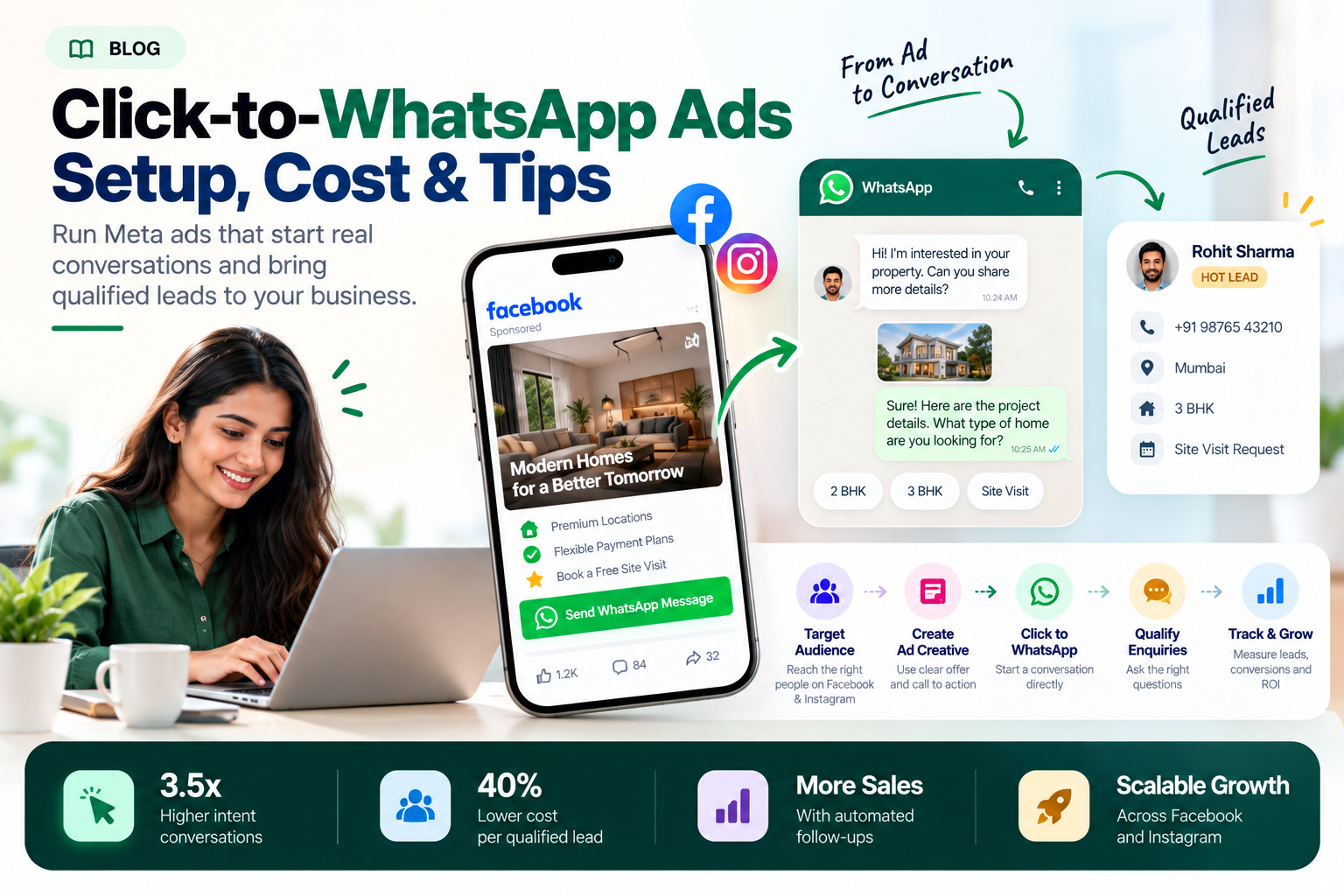
Click-to-WhatsApp ads let potential customers move from a Facebook or
Instagram advertisement directly into a WhatsApp conversation with your business.
Instead of sending every prospect to a separate landing page, businesses
can use this format to answer questions, understand customer requirements
and start conversations with people interested in their products or services.
This guide explains campaign setup, audience targeting, ad creatives,
budget planning, lead quality, conversion tracking, common mistakes
and how ChatKar can connect incoming conversations with sales workflows.
What Are Click-to-WhatsApp Ads?
Click-to-WhatsApp ads
are advertisements that allow a person to start a WhatsApp conversation
with a business directly from an eligible ad placement.
They connect paid advertising with direct customer communication.
Businesses can answer enquiries, explain their offers and qualify prospects
within the conversation.
Facebook
Reach relevant audiences through eligible placements.
Instagram
Use visual content to start conversations.
WhatsApp
Answer questions and capture enquiries.
CRM Workflow
Assign leads and manage follow-ups.
How Click-to-WhatsApp Advertising Works
The process begins with an advertisement and continues inside WhatsApp.
What happens after the customer starts the conversation depends on your
messaging setup and sales process.
Meta Ad
Offer or creative
→
Click
Call to action
→
WhatsApp
Conversation
→
Lead
Qualification
Example
A person sees an advertisement for a business service and clicks
"Send WhatsApp Message". The person asks about pricing, the business
responds, and the enquiry is routed to the appropriate sales team.
Meta describes Click-to-WhatsApp ads as a way to start conversations
from Facebook and Instagram advertisements, with eligible placements
including Feed, Stories and Marketplace.
When Should You Use Click-to-WhatsApp Ads?
This format is particularly useful when prospects need to ask questions
or receive guidance before deciding whether to purchase.
🏠
Real Estate
Property details, site visits, location and budget enquiries.
🛍️
E-Commerce
Product questions, availability and purchase assistance.
🎓
Education
Course enquiries, counselling and admission information.
💼
B2B Services
Consultations, quotations and project requirements.
🛠️
Local Services
Service availability, estimates and booking enquiries.
📣
Consulting
Discovery conversations and consultation requests.
A website landing page or lead form may be more appropriate when a user
needs detailed information, extensive data collection, an online checkout
or a complex application process. Test the format against the real customer journey.
Before You Launch Your First Campaign
Prepare the essential campaign components before spending money.
- A Facebook Page and the relevant advertising account.
- A suitable WhatsApp Business number connected through the available Meta setup.
- A clear product, service or consultation offer.
- Ad creative and copy that accurately describe the offer.
- A defined target audience and service area.
- A greeting or message template where appropriate.
- A person or team ready to handle incoming conversations.
- A measurement plan for leads, qualified enquiries and sales.
Confirm that the WhatsApp destination is connected correctly before
publishing. An advertisement can attract clicks, but an unprepared inbox
can still waste the opportunity.
How to Set Up Click-to-WhatsApp Ads in Meta Ads Manager
Follow this general workflow. Meta periodically changes its campaign
creation interface, so the precise names and locations of some settings
may differ by account, objective or available features.
01
Open Meta Ads Manager
Open Ads Manager, select the appropriate advertising account and
choose the option to create a new campaign.
02
Choose a Suitable Campaign Objective
Select an objective and campaign setup that supports your intended
WhatsApp destination and business outcome. The options available depend
on Meta's current campaign setup and your account.
Depending on the selected workflow, available options may include
Engagement, Leads, Traffic or Sales. Do not assume every objective
has the same messaging options.
03
Select WhatsApp as the Destination
In the appropriate conversion or destination settings, select the
messaging app option and choose WhatsApp where that option is available.
Check that the correct business number is connected.
04
Set Your Budget, Schedule and Audience
Define your test budget, campaign dates, locations, audience settings
and other available targeting options. Make sure the audience fits
your real service area and potential customers.
05
Create the Ad Creative
Upload a suitable image or video, write clear copy, choose the
available WhatsApp call to action and preview how the ad looks on
the selected placements.
06
Configure the Opening Conversation
Where the ad setup provides a message template or greeting configuration,
use it to make the first interaction easy. Keep the initial questions
relevant to the offer and avoid asking for unnecessary information.
07
Review, Publish and Monitor
Check the destination, creative, copy, audience, budget, schedule and
policy requirements. Publish the campaign when everything is ready,
then monitor both advertising metrics and the quality of incoming enquiries.
Official setup guide
Meta's WhatsApp Business guide explains how to create ads that open
WhatsApp conversations from Facebook and Instagram.
Read the official guide →
Which Campaign Objective Should You Choose?
Choose according to the business result you want and the options available
in your Meta Ads Manager account. The name of an objective alone does
not guarantee that your campaign will generate qualified leads.
|
Campaign Consideration
|
What to Check
|
Important Note
|
|
Engagement
|
Available messaging destinations and performance goals.
|
Check the actual optimization option.
|
|
Leads
|
Whether WhatsApp is supported as the conversion location.
|
Availability may depend on the account and setup.
|
|
Traffic
|
Destination and the event you want to optimize for.
|
Clicks are not the same as qualified leads.
|
|
Sales
|
Supported messaging and sales-related optimization options.
|
Use only when the available setup supports your goal.
|
Meta's available campaign setups can change. Check the current Ads Manager
options rather than following an older tutorial if the interface differs.
How Much Budget Do You Need for Click-to-WhatsApp Ads?
There is no single budget that works for every business. The right amount
depends on the audience, offer, market, competition, creative, conversion
process and how much you can afford to test.
Start with a budget that your business can sustain during a meaningful test.
Avoid changing several variables every day, because frequent changes can
make it harder to understand what is producing the result.
Example: A Hypothetical Campaign Budget
This is an illustrative budget calculation, not a recommendation or a
forecast. Actual delivery and spending depend on your campaign settings
and Meta's billing rules. Account for applicable taxes and any additional
creative or operational costs separately.
How to Calculate Cost Per WhatsApp Lead
Do not judge a campaign only by its cost per click or number of conversations.
Measure how many conversations turn into useful business enquiries.
Cost per lead
= Advertising Spend ÷ Number of Leads
Cost per qualified lead
= Advertising Spend ÷ Number of Qualified Leads
Example calculation
Suppose a campaign spends ₹7,000 and produces 100 started conversations.
After reviewing the enquiries, 20 meet your business's lead qualification criteria.
COST PER CONVERSATION
₹70
₹7,000 ÷ 100
COST PER QUALIFIED LEAD
₹350
₹7,000 ÷ 20
These figures are hypothetical and exclude any additional costs. Whether
₹350 per qualified lead is profitable depends on your conversion rate,
average sale value, gross margin and cost of serving the customer.
How to Target the Right Audience
Targeting should help the ad reach people who could realistically use
your product or service. More restrictive targeting is not automatically better.
Location
Select the service area or market where you can serve customers.
Audience
Use relevant targeting options available for your campaign.
Creative
Show the product, problem or service clearly to attract the right interest.
Retargeting
Use eligible audiences where appropriate and follow applicable platform policies.
For local services, ensure the selected geography matches where your business
operates. For businesses serving a broader market, test relevant audience
setups and compare the quality of the conversations they generate.
How to Create Click-to-WhatsApp Ads That Get Attention
Your creative should tell people what you offer, why it is relevant and
what they should do next.
A Strong Creative
- Shows the actual product or service.
- Uses a clear and relevant headline.
- Communicates one main offer.
- Uses a direct call to action.
- Sets realistic expectations.
A Weak Creative
- Uses vague promises.
- Has too much text.
- Does not explain the offer.
- Attracts an irrelevant audience.
- Has no clear next step.
Example ad copy
SAMPLE · DIGITAL MARKETING SERVICE
Looking for More Relevant Business Enquiries?
Tell us about your business, target customers and campaign goals.
Our team can discuss a suitable digital marketing approach for your requirements.
Send WhatsApp Message
Illustrative copy only. Adapt the offer and claims to your actual service.
How to Test and Improve Your Ads
Avoid changing the image, headline, offer, audience and budget at the same
time if you want to understand what caused a performance change.
Test the Offer
Compare genuinely different value propositions.
Test the Creative
Compare relevant image or video concepts.
Test the Audience
Evaluate suitable audience setups without ignoring lead quality.
Test the Opening Chat
Improve the greeting and qualification journey.
Use enough data to make a reasonable comparison. Avoid declaring a winner
from a very small or materially different set of results.
PERFORMANCE DASHBOARD
Metrics You Should Track
The main objective is not simply to generate more WhatsApp clicks.
Measure what happens after those clicks.
CTR
Are people responding to the creative?
Cost per Conversation
How much ad spend generates a started chat?
Cost per Qualified Lead
How much does a suitable enquiry cost?
Response Time
How quickly does the team handle incoming chats?
Lead-to-Sale Rate
How many leads become paying customers?
Return on Ad Spend
How does attributed revenue compare with ad spend?
Remember
A cheap conversation is not necessarily a valuable lead.
Connect campaign reporting to your lead-management process so you can
see which advertising sources generate enquiries that meet your criteria.
8 Common Click-to-WhatsApp Ads Mistakes
1. Optimizing Only for Clicks
Clicks alone do not tell you whether the people contacting the business are suitable leads.
2. An Unclear Offer
People may click without understanding what the business provides.
3. Wrong Audience or Location
Enquiries may come from people the business cannot serve.
4. Too Many Questions
Overcomplicated opening conversations can make it harder for people to continue.
5. Slow Responses
Paying for enquiries without providing a workable response process wastes opportunities.
6. No Source Tracking
Without source data, it is difficult to compare campaign quality accurately.
7. Changing Everything at Once
Multiple simultaneous changes make it harder to identify what improved performance.
8. Ignoring Messaging Rules
Advertising and follow-up must respect applicable platform policies, privacy and consent requirements.
CHATKAR
Connect Click-to-WhatsApp Ads With ChatKar
The advertising click is only the beginning. Once a customer opens WhatsApp,
the business needs a way to handle the conversation, understand the requirement,
assign the lead and maintain follow-up.
ChatKar currently lists Meta Ads and Click-to-WhatsApp workflows, a shared
inbox, flow automation, AI agents, lead-management capabilities and analytics.
Its public product page describes routing Click-to-WhatsApp conversations
into the inbox and pipeline.
Ad-to-Chat Workflow
Bring customers from eligible ads into WhatsApp.
Shared Inbox
Manage incoming conversations in a team workspace.
Automation and AI
Guide customers through supported workflows.
Lead Routing
Direct conversations to the right team.
Follow-Up
Connect enquiries to a defined next action.
Analytics
Review available customer and messaging activity.
Meta Ad
→
WhatsApp
→
ChatKar Inbox
→
Qualification
→
Sales Team
→
Outcome
This is the practical connection between advertising and operations:
acquire enquiries through Meta, then use a defined process to handle
those enquiries and measure business outcomes.
WhatsApp Messaging and Advertising Compliance
Generating a conversation through an advertisement does not remove the
need to follow WhatsApp's business messaging requirements.
Before following up, check:
- Whether the customer expects the communication you plan to send.
- Whether required notices, permissions and consent have been obtained.
- Whether an approved message template is required for the planned message.
- Whether the message accurately reflects your offer.
- Whether the workflow respects customer opt-outs and privacy.
Under the WhatsApp Business Platform rules, business-initiated messaging
outside the applicable customer-service window generally requires approved
templates. Follow the current policy and the messaging requirements displayed
in your business tools.
Read the WhatsApp Business Messaging Policy →
Frequently Asked Questions
What are Click-to-WhatsApp ads?
They are eligible Facebook and Instagram advertisements that allow
people to start a WhatsApp conversation directly with a business.
How do I create Click-to-WhatsApp ads?
Set up the campaign in Meta Ads Manager, choose a supported objective
and WhatsApp destination, configure audience and budget, create the
ad creative, review the message experience and publish.
Can Click-to-WhatsApp ads run on Facebook and Instagram?
Yes. Meta supports these ads across eligible Facebook and Instagram
placements. Available placements depend on the campaign setup.
How much do Click-to-WhatsApp ads cost?
Costs vary with the market, competition, audience, creative, offer,
campaign setup and business results. Measure cost per qualified lead
rather than relying on a universal price.
Which objective should I select?
Choose an objective and performance goal that match your intended
outcome and the WhatsApp options currently available in your account.
Meta's campaign interface may differ by setup and account.
How can I reduce irrelevant WhatsApp enquiries?
Make the offer more specific, align the creative with the audience,
target the correct service area and use a short, relevant qualification
process after the customer starts a conversation.
How do I track Click-to-WhatsApp ad performance?
Use the reporting tools available in Meta, record lead sources in your
workflow, and measure qualified enquiries and sales outcomes. Additional
measurement setups may be available depending on your technical implementation.
Can ChatKar connect Click-to-WhatsApp ads to a sales team?
ChatKar's public product pages describe routing Click-to-WhatsApp
conversations into its shared inbox and pipeline, alongside automation
and lead-management features.
Do customers automatically consent to all future messages after clicking an ad?
No. A conversation started by a customer should not be treated as
blanket permission for every kind of future marketing message. Respect
the applicable consent, privacy and WhatsApp messaging requirements.
Related WhatsApp Business Guides
Final Thoughts
Click-to-WhatsApp ads can make it easier for interested people to contact
a business. But an effective campaign requires more than a good creative
and a WhatsApp button.
The offer needs to be relevant, the audience needs to fit the business,
the opening conversation needs to be useful and the team needs a way to
handle enquiries consistently.
Ad → Conversation → Qualified Lead → Follow-Up → Sale
Measure the full customer journey, not just the click. That is how you
make better decisions about campaign quality and advertising spend.
Connect WhatsApp Ads With Your Customer Workflow
Explore ChatKar's Click-to-WhatsApp workflows, shared inbox, lead routing
and automation features for managing incoming customer conversations.
Explore Features
View Pricing