CRM COMPARISON GUIDE
WHATSAPP CRM · TRADITIONAL CRM
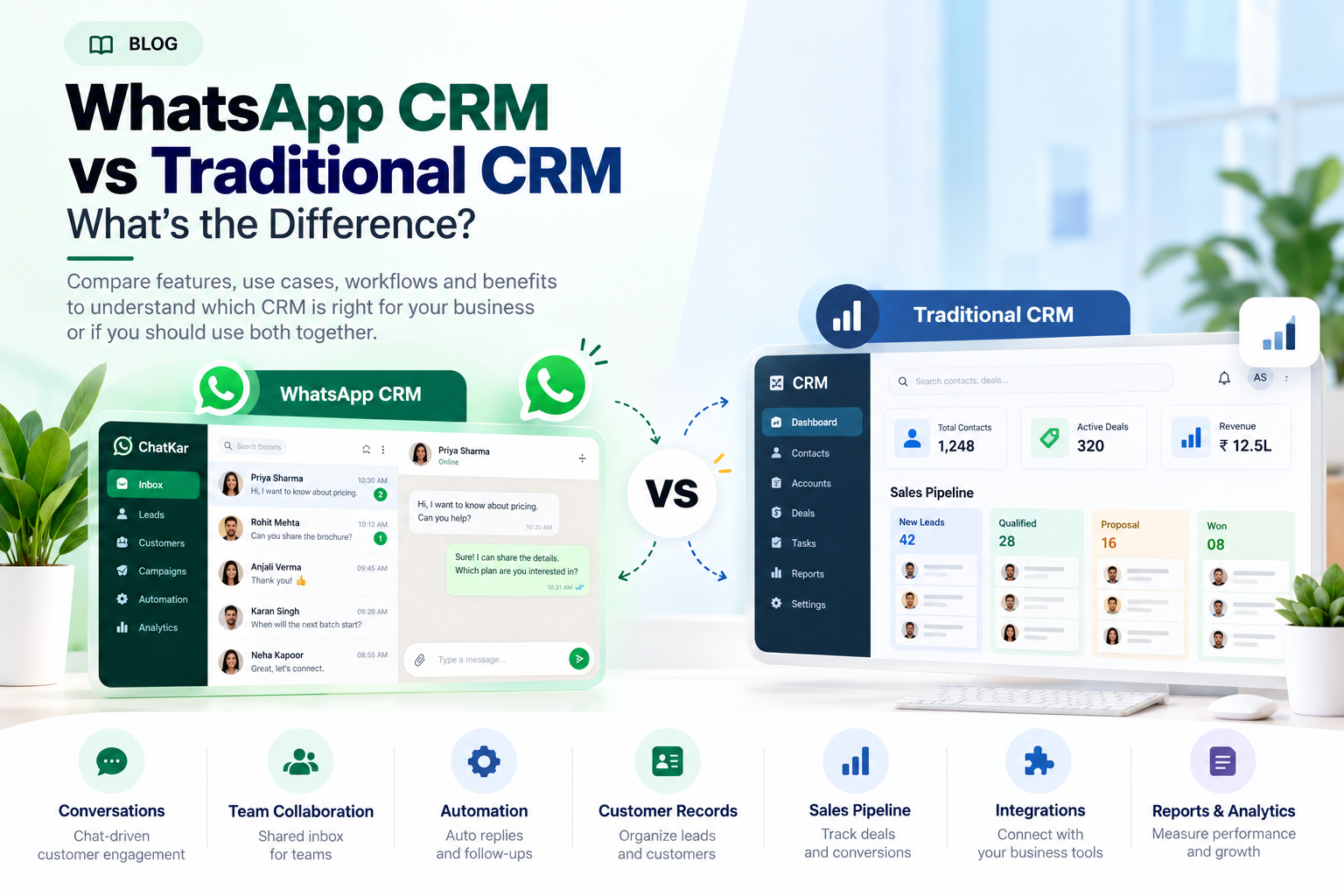
WhatsApp CRM vs Traditional CRM: What’s the Difference?
A WhatsApp CRM and a traditional CRM can both help businesses manage customers,
but they usually start from different parts of the customer journey.
A traditional CRM is typically built around customer records, deals, sales
pipelines and broader business processes. A WhatsApp CRM starts with customer
conversations and connects those conversations with leads, teams, follow-ups
and automation.
This guide compares both approaches and explains when a business may use a
WhatsApp CRM, a traditional CRM, or both together.
Quick Answer: WhatsApp CRM vs Traditional CRM
The simplest distinction is:
a traditional CRM organizes customer and business processes,
while a WhatsApp CRM connects those processes closely to WhatsApp conversations.
The exact feature set varies between products, so compare the actual workflows
rather than relying only on the product name.
Traditional CRM
Usually centered around customer records, opportunities, sales pipelines,
account management, tasks and broader business processes.
Primary question:
What is happening with this customer or deal?
WhatsApp CRM
Usually centered around WhatsApp conversations plus customer context,
lead management, team handling and communication workflows.
Primary question:
What is happening in this customer conversation and what should happen next?
The Core Difference: Record-Centric vs Conversation-Centric
One useful way to understand the difference is to look at where the workflow begins.
TRADITIONAL CRM
Customer / Deal Record
Contact → Account → Lead → Deal → Stage → Task → Follow-Up
WHATSAPP CRM
Customer Conversation
WhatsApp Message → Customer Context → Assignment → Automation → Follow-Up
In practice, modern platforms increasingly blur this line. A WhatsApp CRM can
include lead records and sales workflows, while traditional CRM systems can
connect to WhatsApp. The real difference is which workflow is at the center.
WhatsApp CRM vs Traditional CRM: Complete Comparison
|
Area
|
WhatsApp CRM
|
Traditional CRM
|
|
Primary focus
|
Conversations + customer workflow
|
Customer records + business process
|
|
Main channel
|
WhatsApp-centered
|
Multi-channel / CRM-centered
|
|
Customer conversations
|
Core workflow
|
Usually one part of CRM activity
|
|
Sales pipeline
|
Depends on product
|
Usually core functionality
|
|
Team inbox
|
Often central
|
Usually requires communication integration
|
|
Lead routing
|
Communication-focused
|
CRM/process-focused
|
|
WhatsApp automation
|
Usually central
|
Depends on integration
|
|
Broader business workflows
|
Depends on platform
|
Usually stronger
|
|
Best starting point
|
WhatsApp-led operations
|
Broader business operations
|
When Does a WhatsApp CRM Make More Sense?
A WhatsApp-centered CRM becomes more relevant when most customer interaction
already happens through WhatsApp.
WhatsApp Is Your Main Channel
Most enquiries and customer conversations arrive there.
Speed Matters
Sales and support teams need to respond inside the messaging workflow.
Automation Is Important
You need routing, follow-ups, FAQs or automated journeys.
Your Team Works in Chat
Agents spend most of their day handling conversations rather than updating CRM screens.
When Does a Traditional CRM Make More Sense?
A broader CRM can be useful when the business needs to manage more than
conversations.
Complex Sales Pipelines
Account Management
Multiple Channels
Forecasting
Quotes & Deals
Broad Business Reporting
The exact boundary depends on the CRM product. Some modern CRM platforms
already include messaging, while some WhatsApp platforms offer substantial
lead and customer-management functionality.
Can You Use WhatsApp CRM and Traditional CRM Together?
Yes. For some businesses, using both systems is more practical than trying
to force every function into one product.
WhatsApp
Customer conversation
↔
WhatsApp CRM
Inbox + automation + context
↔
Traditional CRM
Deals + accounts + reporting
In this model, WhatsApp can remain the customer-facing conversation layer
while the traditional CRM manages broader business records and processes.
Example: A Hybrid WhatsApp CRM + Traditional CRM Workflow
1. Lead arrives on WhatsApp
Customer asks for pricing or product information.
2. WhatsApp CRM qualifies the enquiry
Questions identify product, requirement and lead context.
3. Lead is assigned
Conversation reaches the correct sales person.
4. Deal enters the traditional CRM
The opportunity can be tracked through the broader sales process.
5. Salesperson continues conversation
WhatsApp remains the communication channel.
Feature-by-Feature Difference
Conversations
WhatsApp CRM typically puts live conversation management closer to the center of the workflow.
Customer Records
Both can maintain customer information, but the depth and structure vary by product.
Lead Routing
WhatsApp CRM routing is often directly connected to incoming conversations.
Automation
WhatsApp CRM automation often focuses on conversation events, replies, flows and follow-ups.
Deal Management
Traditional CRM platforms often provide deeper sales-pipeline and opportunity management.
Reporting
Traditional CRM often emphasizes broader sales and account reporting; WhatsApp CRM can emphasize conversation and messaging activity.
CHATKAR
Where ChatKar Fits
ChatKar currently positions itself as a WhatsApp-focused customer engagement
platform with team inboxes, customer and lead management, broadcasts,
flow automation, analytics, integrations and AI capabilities. Its current
India pricing page also lists a Business Plus CRM plan. :contentReference[oaicite:1]{index=1}
Team Inbox
Shared customer conversations
Lead Management
Capture and organize enquiries
Automation
Flows and follow-up workflows
Integrations
Connect other business systems
Analytics
Track customer activity
This makes ChatKar relevant when a business wants WhatsApp to be a major
part of its customer communication and lead-management workflow, while
broader CRM requirements can still be handled through integrations where needed.
Which One Should Your Business Choose?
Instead of asking which product is universally better, compare the system
against the work your business actually needs to perform.
Consider a WhatsApp CRM when:
- WhatsApp is a major source of leads.
- Sales and support happen mainly in conversations.
- You need a shared WhatsApp inbox.
- Automation is important.
- Fast routing and follow-up matter.
Consider a traditional CRM when:
- You need broad account and deal management.
- Your workflow covers multiple channels and teams.
- Forecasting and pipeline management are central.
- Business reporting goes beyond messaging.
- You need a system of record for wider operations.
When Using Both Is the Better Architecture
A larger business may not need to choose only one.
WhatsApp CRM
Handles conversations, inbox, messaging automation and immediate customer interaction.
Traditional CRM
Handles account records, pipeline, deals, forecasting and wider business processes.
Integration
Keeps customer and lead information synchronized between the systems.
10 Questions to Ask Before Choosing
1.
Where do most customer enquiries happen?
2.
Do salespeople mainly work inside WhatsApp?
3.
Do we need a shared inbox?
4.
How complex is our sales pipeline?
5.
Which automations do we actually need?
6.
Which existing systems need integration?
7.
What reporting does management need?
8.
How will WhatsApp messaging costs be handled?
9.
Do we need both systems connected?
10.
Can the platform scale with our team and message volume?
Frequently Asked Questions
Is WhatsApp CRM the same as a traditional CRM?
No. They can overlap, but a WhatsApp CRM typically puts WhatsApp
conversations and communication workflows much closer to the center.
A traditional CRM is usually built around broader customer, sales and
business records.
Can WhatsApp CRM replace a traditional CRM?
Sometimes, depending on the business requirements and the platform's
features. For complex account, deal, forecasting or broader operational
needs, a traditional CRM may still be useful.
Can a traditional CRM integrate with WhatsApp?
Yes. CRM systems can connect WhatsApp through supported integrations,
APIs or third-party platforms.
Which is better for sales teams?
It depends on the workflow. Teams that sell mainly through WhatsApp
may value a WhatsApp-centered workflow, while teams with complex
pipelines and broader account-management requirements may need a
traditional CRM or a hybrid setup.
Can both systems share customer data?
Yes, where compatible integrations or APIs are available. The exact
fields and synchronization depend on the products being connected.
Is WhatsApp CRM only for WhatsApp?
Not necessarily. Some WhatsApp-focused platforms also support other
channels. ChatKar currently lists WhatsApp, Instagram, Facebook,
Telegram, TikTok and SMS within its omnichannel feature set. :contentReference[oaicite:2]{index=2}
Does ChatKar provide CRM functionality?
ChatKar currently lists contact and lead management, team inboxes,
campaigns, automation, analytics and integrations, and its India
pricing page includes a Business Plus CRM plan. :contentReference[oaicite:3]{index=3}
Can WhatsApp CRM handle automated customer communication?
Compatible WhatsApp Business Platform solutions can automate supported
customer journeys. Business-initiated messaging remains subject to
WhatsApp's current template and policy requirements. :contentReference[oaicite:4]{index=4}
Related WhatsApp CRM Guides
Final Thoughts
WhatsApp CRM and traditional CRM are not necessarily competing ideas.
They can solve different parts of the same customer journey.
A business that receives most of its enquiries through WhatsApp may need
a communication-first system. A business with complex deals, accounts,
forecasting and broader operations may need a traditional CRM. A larger
organization may connect both.
The right question is not "Which CRM is better?"
The better question is:
"Where does our customer journey actually happen, and which system
should manage each part of it?"
Build a WhatsApp-Centered Customer Workflow
Explore ChatKar for WhatsApp conversations, team inboxes, lead management,
automation, integrations and customer engagement workflows.
Explore Features
View Pricing