WHATSAPP MESSAGE TEMPLATES · 2026
WhatsApp Message Templates: Categories, Rules, Examples & Approval
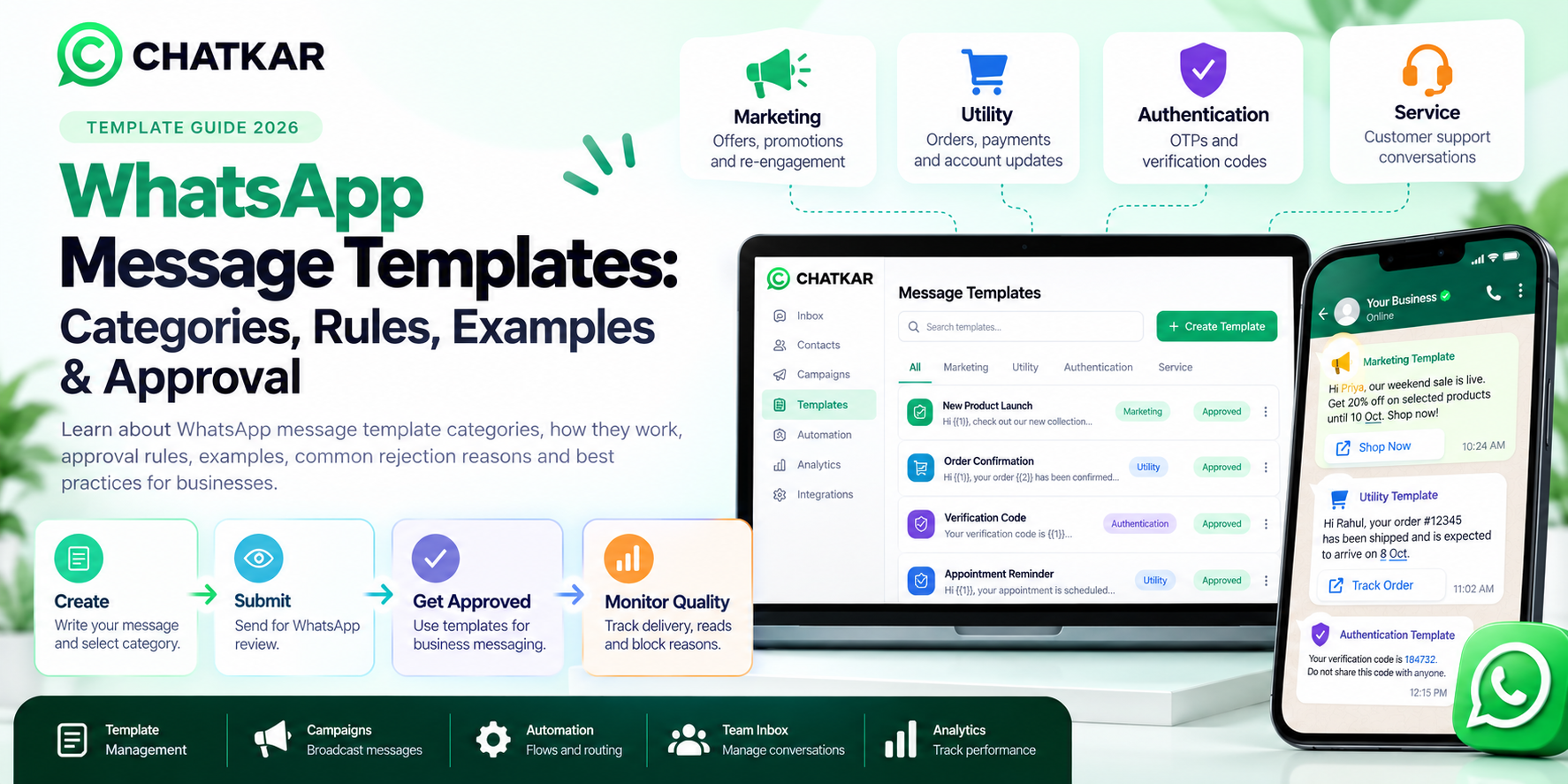
WhatsApp message templates are pre-approved message formats
that businesses use for business-initiated communication on the WhatsApp
Business Platform.
Templates are important for marketing, utility and authentication workflows,
as well as business-initiated conversations outside the applicable customer
service window.
This guide explains WhatsApp template categories, how templates work,
approval rules, examples, common rejection reasons, quality signals,
variables, buttons and best practices for creating templates that are
clear, useful and aligned with WhatsApp requirements.
Quick Answer: What Is a WhatsApp Message Template?
A WhatsApp message template is a structured business
message format that can be reviewed and approved for use on the WhatsApp
Business Platform. Templates can contain text, variables and supported
interactive or media elements depending on the template format.
Businesses commonly use templates for:
Marketing
Offers, promotions, product recommendations and re-engagement.
Utility
Orders, payments, appointments and account updates.
Authentication
OTPs and identity-verification messages.
Business-Initiated Messaging
Approved templates used to start conversations.
WhatsApp's current Business Policy states that businesses may initiate
conversations on the Business Platform only with approved message templates.
During the applicable 24-hour customer-service window, businesses can respond
to users without a template. :contentReference[oaicite:1]{index=1}
WhatsApp Message Template Categories
Choosing the correct category is one of the most important parts of template creation.
The message content and purpose should match the category selected.
1. Marketing Templates
Marketing messages are used for promotional and customer-engagement purposes.
WhatsApp describes marketing messages as covering awareness, sales, loyalty
and re-engagement use cases. :contentReference[oaicite:2]{index=2}
Common use cases
- New product announcements
- Discounts and offers
- Price-drop notifications
- Product recommendations
- Abandoned-cart reminders
- Customer re-engagement
- Loyalty campaigns
Example:
Hi {{1}}, our weekend collection is now live. Explore the latest products
and enjoy {{2}} off until {{3}}.
2. Utility Templates
Utility messages are generally tied to a customer action, transaction,
account or other requested or important update. WhatsApp's current guidance
includes order updates, account alerts, payment reminders and similar
transaction-related communications. :contentReference[oaicite:3]{index=3}
Common use cases
- Order confirmations
- Payment updates
- Shipping and delivery updates
- Appointment reminders
- Account alerts
- Subscription updates
- Feedback requests
Example:
Hi {{1}}, your order {{2}} has been confirmed and is expected to arrive
on {{3}}. Track your order here: {{4}}
3. Authentication Templates
Authentication messages are used to send one-time passcodes for identity
verification, account creation, recovery and related authentication workflows.
WhatsApp provides specific authentication capabilities for these use cases. :contentReference[oaicite:4]{index=4}
Common use cases
- Login OTP
- New account verification
- Account recovery
- Identity verification
- Authentication during supported transactions
Example:
Your verification code is {{1}}. Do not share this code with anyone.
4. Service Messages
Service messages are used for customer-service interactions, particularly
when a user has already contacted the business.
During the applicable 24-hour customer-service window, businesses can respond
to customer messages without using a message template. WhatsApp's current
Business Platform guidance distinguishes these service interactions from
business-initiated template messaging. :contentReference[oaicite:5]{index=5}
Example:
Customer: Can you tell me where my order is?
Business: Sure. Please share your order number.
How to Choose the Correct Template Category
Do not choose a category simply because it appears cheaper or more convenient.
The category should match the actual purpose of the message.
|
If Your Message...
|
Likely Category
|
Example
|
|
Promotes a product or offer
|
Marketing
|
20% off this weekend
|
|
Gives an order or payment update
|
Utility
|
Your order has shipped
|
|
Sends a verification code
|
Authentication
|
Your OTP is 184732
|
|
Replies to an active customer conversation
|
Service
|
Here is the update you requested
|
What Can a WhatsApp Message Template Contain?
Depending on the template format and supported features, businesses can
structure templates using different message components.
Header
Text or supported media depending on the template type.
Body
The main message content.
Variables
Dynamic information such as names, order numbers or dates.
Buttons
Supported action or reply options where applicable.
Footer
Optional supporting text depending on the template format.
How to Use Variables in WhatsApp Templates
Variables allow businesses to insert dynamic information into a template
without creating a completely new template for every customer.
Template:
Hi {{1}}, your order {{2}} is scheduled for delivery on {{3}}.
In this example:
- {{1}} can represent the customer's name.
- {{2}} can represent the order number.
- {{3}} can represent the expected delivery date.
Best practice:
Keep variables easy to understand and ensure your system always supplies
valid values. Avoid creating templates that are almost entirely made up
of unexplained variables.
WhatsApp Message Template Examples
Marketing Template Example
Hi {{1}}, our weekend sale is live. Get {{2}} off selected products until {{3}}.
Shop now: {{4}}
Category: Marketing
Utility Template Example
Hi {{1}}, your order {{2}} has been shipped and is expected to arrive on {{3}}.
Category: Utility
Authentication Template Example
{{1}} is your verification code. Do not share this code with anyone.
Category: Authentication
Appointment Template Example
Hi {{1}}, your appointment with {{2}} is scheduled for {{3}} at {{4}}.
Please contact us if you need to reschedule.
Category: Usually Utility when it is genuinely related
to an appointment or requested transaction.
How WhatsApp Template Approval Works
Template approval is not simply a matter of submitting any marketing message
and waiting for it to go live.
1. Create
Write the message and select the intended category.
2. Review
Check content, variables, purpose and policy alignment.
3. Submit
Submit the template through the supported WhatsApp business tooling.
4. Review Status
Monitor whether the template is approved, pending, rejected or paused.
WhatsApp states that it may review, approve, pause or reject message templates
and that templates must follow its policies and be used only for their designated
purposes. :contentReference[oaicite:6]{index=6}
WhatsApp Template Quality: Why It Matters
Approval is not the end of the process. Template quality can affect how
your messaging performs over time.
WhatsApp's current Business Manager template tooling exposes information such
as template status, quality rating, delivered messages, read rate and top
block reasons. :contentReference[oaicite:7]{index=7}
Delivery
Are messages reaching users?
Read Rate
Are customers opening messages?
Block Reasons
Are users rejecting the communication?
Quality Signals
Does the template continue to provide a good experience?
Businesses should therefore treat template quality as an ongoing operational
metric rather than something that matters only during submission.
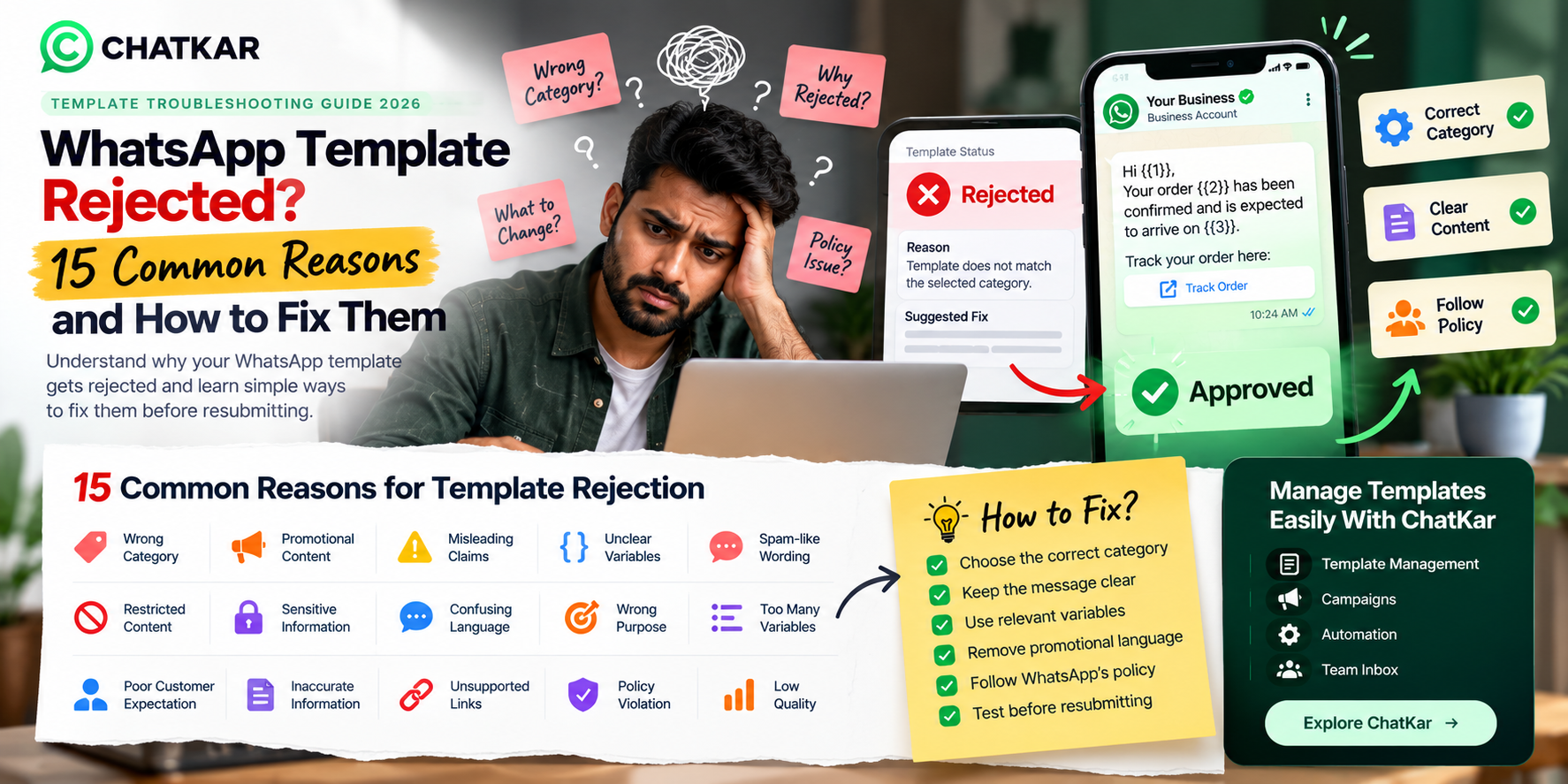
Common Reasons WhatsApp Templates Can Be Rejected
The exact reason for a rejection depends on the submitted content and current
WhatsApp review criteria, but common problem areas include:
1. Incorrect Category
The actual content does not match the category selected during submission.
2. Promotional Content Inside a Non-Marketing Message
A message presented as transactional or service-related may contain
promotional language that changes its purpose.
3. Unclear Variables
Variables are poorly positioned, not properly explained or depend on
unreliable values.
4. Misleading or Unsupported Claims
The message contains claims or wording that may conflict with applicable
WhatsApp or business policies.
5. Poor Customer Experience
Excessive, irrelevant or unwanted messaging can lead to blocks and reports,
which can affect business messaging quality.
Bad vs Better WhatsApp Template Examples
Poor Example
Hello!!! Amazing OFFER!!! Buy NOW and get the BEST PRICE!!!
Click immediately!!!
Problems: excessive promotional language, poor clarity and weak relevance.
Better Example
Hi {{1}}, our weekend offer is now available. You can save {{2}} on
selected products until {{3}}. View the offer: {{4}}
Clear purpose, readable structure and useful customer context.
WhatsApp Message Template Best Practices
1. Match the Category
Choose the category that genuinely matches the message purpose.
2. Keep It Clear
Write for a customer, not for a template reviewer.
3. Use Variables Carefully
Make every variable meaningful and predictable.
4. Avoid Unnecessary Promotion
Especially inside messages whose purpose is transactional.
5. Respect Consent
Communicate only with users who have appropriately opted in where required.
6. Monitor Quality
Review delivery, reads, blocks and other available quality signals.
WhatsApp's current policy emphasizes quality experiences, appropriate consent
and respecting user expectations. Users can block or report businesses, and
WhatsApp may take action where messaging quality remains low. :contentReference[oaicite:8]{index=8}
A Practical WhatsApp Template Workflow
Business Use Case
→
Message Category
→
Template Draft
→
Variables / Buttons
→
Policy Review
→
Submission
→
Approval
→
Quality Monitoring
Building templates this way helps businesses avoid treating message creation
as a simple copy-paste exercise. The message should first solve a real business
communication need.
CHATKAR
Create and Manage WhatsApp Templates With ChatKar
ChatKar brings WhatsApp messaging workflows, templates, team inboxes,
campaigns and automation into one business workspace.
Instead of creating a template and then managing everything separately,
businesses can connect templates with the workflows where those messages
are actually used.
Template Management
Organize business messaging templates.
Campaigns
Connect templates to messaging campaigns.
Automation
Use templates inside business workflows.
Team Inbox
Move from automation to human assistance.
ChatKar also provides template-related workflow tools designed to help
businesses prepare and manage their WhatsApp messaging operations.
Related WhatsApp Business Guides
Frequently Asked Questions
What is a WhatsApp message template?
A WhatsApp message template is a structured business message format
that can be reviewed and approved for eligible Business Platform use cases.
What are the main WhatsApp template categories?
The main categories are Marketing, Utility, Authentication and Service.
Service conversations are primarily customer-service interactions,
while templates are especially important for business-initiated messaging.
Do all WhatsApp messages need templates?
No. Businesses can respond to a user without a template during the
applicable 24-hour customer-service window. Business-initiated conversations
require approved templates under the current WhatsApp Business Platform rules.
Why was my WhatsApp template rejected?
Rejections can happen for several reasons, including category mismatch,
content-policy issues, unclear variables, unsupported claims or other
problems identified during review. Check the status and feedback provided
by the WhatsApp business tools.
Can a utility template contain promotional content?
A utility message should genuinely serve a utility or transactional purpose.
Promotional content can change the nature of the message, so businesses
should review the current category requirements rather than trying to
classify marketing content as utility.
Can WhatsApp change a template's status?
Yes. WhatsApp can review, approve, pause or reject templates according
to its policies and current enforcement systems. :contentReference[oaicite:9]{index=9}
How can I improve WhatsApp template quality?
Use relevant messaging, clear wording, accurate category selection,
appropriate consent and useful customer communication. Also monitor
delivery, read rate and block-related quality signals where available.
Can I use variables in WhatsApp templates?
Yes. Variables can be used to insert dynamic information such as
names, order numbers, dates and other customer-specific values where
supported by the template format.
Can I create WhatsApp templates with ChatKar?
ChatKar provides tools for managing WhatsApp messaging templates and
connecting them with campaigns and automation workflows.
Final Thoughts
WhatsApp message templates are more than pre-written messages. They are
part of the structure businesses use to communicate with customers through
the WhatsApp Business Platform.
The best results come from matching the template to the actual customer
journey:
Customer Need
→
Correct Category
→
Clear Template
→
Approval
→
Delivery
→
Quality Monitoring
Avoid trying to manipulate categories simply to reduce costs or increase
approval chances. Build messages that genuinely provide value to the customer,
follow WhatsApp's current rules and are connected to a useful business workflow.
For businesses managing multiple templates:
A centralized platform can make it easier to organize templates,
connect them with campaigns and automation, and move conversations
to a human team when required.
Ready to Manage WhatsApp Templates More Efficiently?
Create, organize and connect WhatsApp templates with campaigns,
automation, team inboxes and business workflows through ChatKar.
Explore Features
View Pricing